Hi Everyone,
Sorry for being quiet for so long, we have been working on some major updates to the system which have required us to go dark for about a month.
We are proud to say we now offer support for the Actionstep Daily Data Export.
We recommend all Workzilla firms switch over to the Daily Data Export (instructions provided below) for greater data accuracy and greater support for target tracking.
**Please note, while we have extensively tested this feature, if you find any problems, please report them as soon as you can.
Pros and cons of switching over to the Daily Data Export
Pros
- Invoice payment dates
- The daily data extract includes payment dates for all payments, making payment tracking more effective for collection data.
- Part Payments
- Allows us to see the part payment amounts, totals and dates.
- Invoice payment allocations
- When allocating payments to disbursements and fee earners the daily data extract includes exacting information.
- Discount allocations
- Allows us to know how discounts were allocated to staff members at the point of invoicing, affecting their invoiced targets and performance tracking on invoiced amounts.
- Fee allocations
- Allows us to see fee allocations on invoicing, including manual fee allocations.
Cons
- Daily extract
- The data is no longer real-time and reflects “yesterdays” data.
*Note: There will be no change in pricing for people using either the Live API or the Daily Data Extract.
How to enable the service in Actionstep (approx. 3 minutes):
How to enable in Workzilla (approx. 3 minutes):
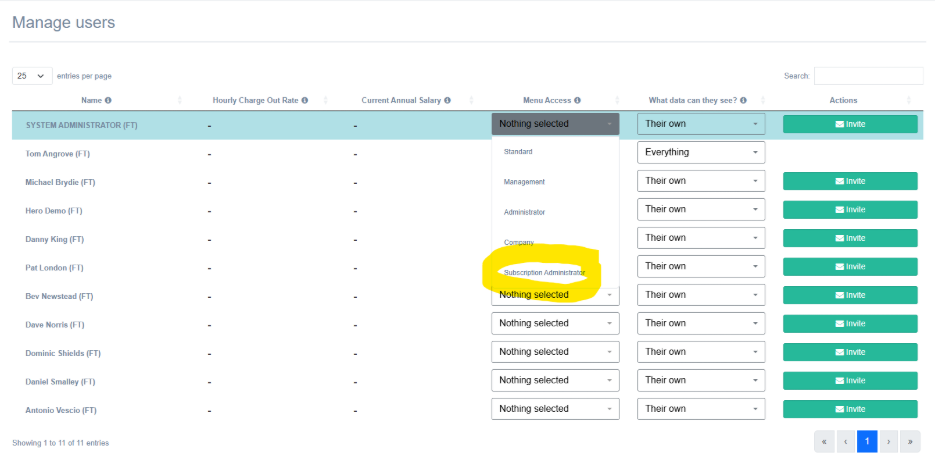
- Admin > Manage Users: Provide a user with “Subscription” menu access. NOTE: this will also enable that person to access your Workzilla subscription.
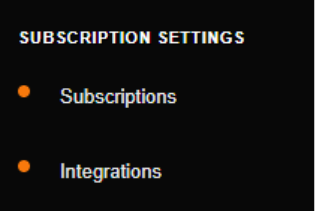
- Once enabled: For that user a new section of the menu will be available called “Subscription Settings”:
3. Subscription settings > Integrations: Enter your data extract password and press save.
*Note: We know that there is not enough feedback on this page to let you know that you have saved it correctly. We are going to be releasing that as soon as possible. For now, if you enter the password and press save the system will begin the process and you will get a pop-up in a short time to let you know the process has completed.
**Note: For the archived data from the data extract to work it will run overnight, meaning that you will have to until the next morning after enabling this in Actionstep before Workzilla can read any data.
Other Changes
Enhanced Drill Downs
Drill downs across the system have been enhanced with greater flexibility and filters.
Including:
- Date ranges
- Team member filters
- Relationship filters
- Matter Type filters
- Enhanced aggregation
New Matters Chart on Dashboard
The old chart wasn’t really working the way we wanted it to. We have changed this chart to now just show new matters, with no breakdown of whether the matter was opened by an existing client or a new client. This allows you to more easily break the chart down by matter type etc.
We will return to a client breakdown style chart at a later date.
Known Issues and features
Support for “Write Offs”
We are working on supporting write offs for both fees and invoices in the next release. This will only work with the Daily Data Extract (the API does not provide any data on Write Offs).
API only: GST incorrectly applied to collected amounts and disbursement allocation on payments incorrectly calculated.
We are working on both of these problems and will hopefully have them fixed shortly.
Daily Data Extract password – quality of life changes
- Show that a password has saved
- Show when the password was entered, and by whom
- Show that the system is applying the password with saving (it worked!)
Explanations of how we arrive at billable and collected fees
When checking Workzilla data against available Actionstep reports you may find some discrepancies that require an explanation.
We will soon be adding the explanations below to our reports and drilldowns which will help the user arrive at the desired number and to explain our rationale.
Credit allocation/application does not alter someone’s collected figure
When allocating a credit to an invoice (paying the invoice with a credit) we will not be “deducting” that amount from someone’s collected target or performance metric.
Rationale: there are many reasons to issue a credit balance to a matter/client. Most reasons do not imply that the person who contributed billable fees to an invoice should be penalised. In fact, by issuing billable fees worthy of payment they are cancelling out a firm liability by wiping out the credit balance against the file. Thus, we will not be penalising them and, as a result, our number will differ from Actionstep collected allocations.
Discounts do not affect billable fees
Discounts are applied to an invoice, not to a timesheet directly. As a result, any chart or target that looks at billable fees will not be affected by a discount.
Rationale: discounts on an invoice cannot be directly attributed to the quality of someone’s billable work. There are many reasons to discount an invoice that do not 100% relate to the quality of work.
An invoice may also be generated many months after someone’s timesheet has been submitted, meaning that any target relying on billable hours may have long since passed.
We believe it is therefore simpler to simply ignore discounts for the purpose of billable hours and fees.
*Note: Discounts will apply to someone’s invoiced totals.
No Charge is included in Billable Fees
We include no charge timesheets in billable fee targets.
Rationale: A no charge timesheet does not itself infer that the work was not billable. For that metric we rely on the numbers within the timesheet, and the tickbox that tells us if the timesheet is billable or non-billable.
Credits Applied do not subtract from existing collected totals
When you pay an invoice with a credit allocation this does not decrease the amount of monies collected by the firm. In some reporting this would be counted as a negative amount. We do not count it as collected funds, nor do we count it as a ‘negative’ amount.
Collected fees will reflect monies that the debtor has paid in return for services.
Tom